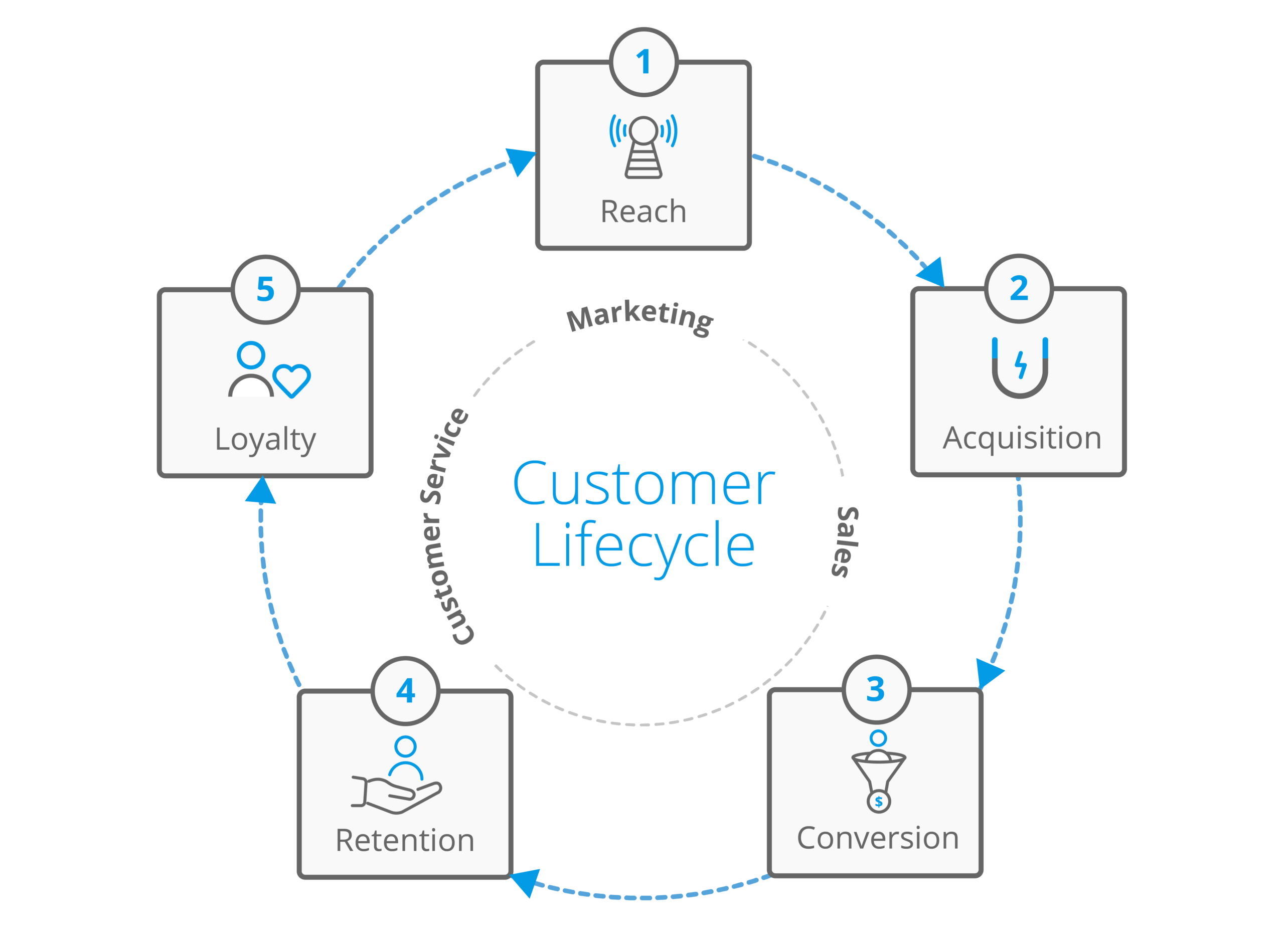
Customer Relationship Management (CRM) is more than just storing contact details—it’s about building long-term customer relationships through personalized, consistent, and timely interactions. CRM lifecycle automation techniques are the key to achieving this at scale. By automating processes throughout the customer lifecycle—from acquisition to retention—businesses can boost efficiency, improve customer satisfaction, and drive more revenue with less manual effort.
This comprehensive guide covers the most powerful CRM lifecycle automation strategies, use cases, and best practices for optimizing every stage of the customer journey.
Understanding CRM Lifecycle Automation
CRM lifecycle automation refers to the use of automation tools within a CRM system to manage and streamline customer interactions throughout their lifecycle. This includes:
- Lead capture and nurturing
- Client onboarding
- Sales follow-ups
- Customer support
- Re-engagement and loyalty campaigns
Automation ensures no lead or customer falls through the cracks while enabling teams to focus on strategic work rather than repetitive tasks.
The 5 Stages of the CRM Customer Lifecycle
To automate effectively, businesses must understand the customer journey:
1. Awareness Stage
The customer becomes aware of your brand, typically through marketing efforts such as SEO, social media, or ads.
2. Consideration Stage
Prospects engage with content, attend webinars, or request information, signaling intent to purchase.
3. Decision Stage
Leads convert into customers by purchasing a product or service.
4. Retention Stage
Post-purchase activities including onboarding, support, and regular communication ensure satisfaction.
5. Advocacy Stage
Happy customers become brand advocates, leaving reviews or referring others.
CRM automation techniques can be deployed at each of these stages for maximum effectiveness.
Automation Techniques for Each Stage of the CRM Lifecycle
1. Lead Capture and Qualification (Awareness & Consideration Stages)
Automated Techniques:
- Web Forms & Chatbots: Collect contact information and qualify leads instantly.
- Email Drip Campaigns: Educate leads through timed sequences based on their interests.
- Lead Scoring: Automatically assign scores based on behavior, engagement, and demographic fit.
- Auto-assign to Sales Reps: Route hot leads to the appropriate team member for fast follow-up.
Benefits:
- Shortens response times
- Increases lead-to-customer conversion
- Improves personalization early in the journey
2. Sales Funnel Automation (Consideration to Decision Stage)
Automated Techniques:
- Follow-Up Sequences: Trigger personalized follow-ups when a lead downloads content or attends a demo.
- Deal Stage Notifications: Automatically update pipeline stages and notify stakeholders when leads take action.
- Quote & Proposal Generation: Automate creation and sending of proposals when deals hit certain stages.
- Calendar Booking Integration: Send auto-invitations for meetings or consultations.
Benefits:
- Ensures timely follow-ups
- Reduces sales cycle length
- Eliminates manual errors in sales operations
3. Onboarding and Client Success Automation (Post-Purchase / Retention)
Automated Techniques:
- Welcome Emails & Tutorials: Triggered upon sign-up or purchase to introduce features and tools.
- Milestone Tracking: Celebrate customer wins (first login, completed profile, etc.) automatically.
- Task Creation: Automatically create internal tasks for onboarding specialists when new customers are added.
Benefits:
- Increases product adoption
- Reduces churn during onboarding
- Enhances first impressions and brand loyalty
4. Support and Customer Satisfaction Automation
Automated Techniques:
- Ticket Routing: Automatically direct support tickets to the appropriate team or agent.
- CSAT/NPS Surveys: Triggered after support interactions or milestone events.
- Escalation Alerts: Notify managers if SLAs are breached or customer satisfaction is low.
Benefits:
- Improves response and resolution times
- Gathers feedback for process improvements
- Helps identify churn risks proactively
5. Re-Engagement and Retention (Retention & Advocacy Stages)
Automated Techniques:
- Reactivation Campaigns: Automatically email inactive customers after X days of no activity.
- Anniversary/Birthday Emails: Personalize communication based on dates stored in the CRM.
- Loyalty Offers: Trigger reward emails for frequent buyers or long-term clients.
Benefits:
- Boosts customer lifetime value
- Encourages repeat business
- Turns customers into advocates
Best Practices for CRM Lifecycle Automation
1. Map the Customer Journey
Before automating, clearly define each stage of your customer lifecycle. Map out every touchpoint, pain point, and opportunity to personalize.
2. Segment Your Audience
Use segmentation to ensure messaging is relevant. Segments can be based on:
- Demographics
- Purchase history
- Engagement levels
- Industry or location
3. Personalize at Scale
Merge tags and dynamic content allow you to personalize emails, messages, and experiences without manual input.
Example:
“Hi [First Name], we noticed you viewed our [Product Name]—here’s a special offer just for you.”
4. Monitor and Adjust
Automation isn’t “set it and forget it.” Use analytics to track performance, tweak triggers, and refine campaigns for better ROI.
5. Ensure Human Oversight
While automation saves time, always allow for human intervention when needed—especially in support or sales situations where empathy is crucial.
Top CRM Tools That Support Lifecycle Automation
Several CRM platforms offer powerful automation features out of the box:
1. HubSpot
- Visual workflows
- Lead nurturing
- Sales automation
- Post-sale engagement
2. Salesforce
- Process automation through Flow Builder
- Einstein AI for predictive insights
- Customizable automation rules
3. Zoho CRM
- Blueprint for lifecycle automation
- Webhooks and integrations
- Automated task assignments
4. ActiveCampaign
- Email and behavior-based automation
- Lead scoring
- SMS and site messaging triggers
5. Pipedrive
- Sales-focused automation
- Workflow automation builder
- Trigger-based email communication
Measuring the Impact of CRM Automation
Track KPIs to evaluate the effectiveness of your automation strategies:
- Lead conversion rate
- Sales cycle duration
- Customer onboarding time
- Churn rate
- Email open and click rates
- Client satisfaction (CSAT/NPS)
Use these insights to improve workflows, refine segmentation, and scale what works.
Conclusion: Automate Smarter, Not Harder
CRM lifecycle automation empowers businesses to deliver consistent, timely, and personalized experiences across every stage of the customer journey. When used strategically, automation boosts efficiency, enhances customer satisfaction, and fuels long-term growth.